SRT decoder for your Mac SDI and NDI output.

Just Mini Server application

A studio SRT server for Apple Silicon.
Receive and decode SRT, with SDI and NDI output—without a dedicated SRT gateway appliance.

Download 21-day free trial View Per-Event plans

Full features. Periodic watermark.

Full Pack with SDI from $60.

Features

SRT - In, SDI & NDI Out

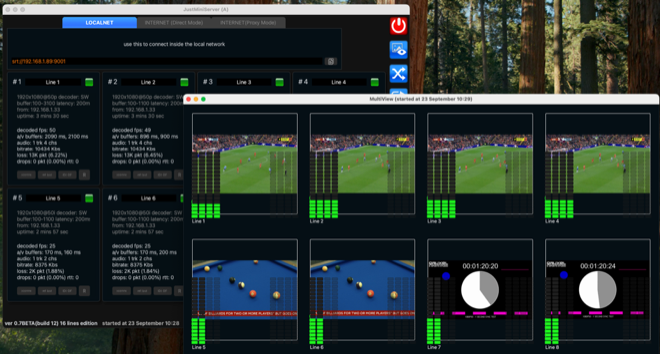
JMS allows Studio to receive SRT signal and convert it to SDI & NDI for further production workflow.
Easy deployment

JMS is easy to install, has a clear interface and will allow you to receive a signal in just a few minutes

Compatible with all SRT encoders

JMS is compatible with encoders from Haivision, Magewell, Kiloview, OBS, vMix etc.

SRT Listener & Caller mode

The server supports Caller mode: this means that you can initiate a connection to a remote signal source.

Single and Multi ports options

The server can receive the signal on a single port, using Stream ID to separate the streams, as well as on multiple ports if required by the sender.

Proxy-mode for work without dedicated IP

JMS can receive the signal even if you don't have a dedicated IP or can't configure a firewall for port forwarding.

SRT-stream routing

SRT-stream routing is a unique functionality that allows easy two-way video streaming between many participants

Multi-codecs

HEVC / H 264 / MPEG 2, AAC / AC3 / MPGA Interlace & Progressive

4K & 8K ready

JMS is ready to handle high resolution content.

Timecode sync support

JMS can read Timecode and output already synchronized streams

SMPTE-2110 Ready

Planning to move to SMPTE 2110 in the future? We already support it.

OMT Ready

JMS supports OMT (Open Media Transport) for modern IP video workflows.

BlackMagic/DeckLink native support

Native output to SDI, HDMI, and SMPTE 2110 via Blackmagic DeckLink cards.

Do you need anything else?

We are always open to new ideas, so please write your ideas, wishes and questions

FAQ

Is there a trial mode to try the software?
Yes. We provide a 21-day trial. The only difference from the full version is a periodic trial watermark; all other features are the same as the licensed product. More details: Trial Info.
What kinds of licenses are there?
After you try the free trial and decide JMS fits your workflow, you can buy a license. There are two types: Per-Event (short, a few days — a good fit if you need JMS once a year for a show) and Permanent (ongoing use). See current prices and place an order on the Store page.
Which SRT modes does JMS support?
Listener & Caller. JMS can work as an SRT Listener — for example when reporters or cameras send you a signal and JMS receives those streams. It also supports Caller mode — for example when you need to pull a stream from a media provider; in that case JMS connects as a Caller to the remote server and starts receiving the stream.
Does JMS support 4:2:2 10-bit?
Yes. All internal processing runs in 4:2:2 16-bit, so 4:2:2 10-bit is fully covered as well.
Does JMS support Interlaced for HEVC and H.264?
Yes. Interlaced streams are supported the same as progressive — for both HEVC and H.264.
Which output cards are supported?
At the moment: Blackmagic DeckLink. If you need AJA support, we are working on it — write to Support@GaraninApps.com and we will help.
Can I receive an incoming signal over LTE or Starlink?
Yes. Even though LTE and Starlink usually do not provide a dedicated public IP, JMS has a special Proxy Mode that lets you accept an incoming signal in Listener mode without one.
Can I use JMS on Intel-based Mac?
No. We develop JMS exclusively for the Apple Silicon CPU because we want to take advantage of it for signal processing.

Just Download and Try

requirements: macOS Apple Silicon (M1, M2 etc)

Download v1.0.4

release notes