AJA Out
The toolbar button is AJA Out. The window title is AJA Outputs Addon.
AJA Out sends a decoded line to an AJA card. It is a separate addon from BMD Out: turn on only the hardware you use.
AJA boards in this class cover both SDI and SMPTE 2110. Channels from either family show up as rows in the same addon.
SDI / 2110 output (AJA or Blackmagic) is part of the Full Pack. The trial always runs as Full Pack, so you can test the card before you buy. (more »)
1. Confirm the card on the Mac
Install the current AJA drivers / software for your card so macOS can see the device. If the card does not appear in AJA tools on this Mac, JustMiniServer will not list it either.
2. Open AJA Out
In JustMiniServer, press AJA Out in the right sidebar. The AJA Outputs Addon window lists each available output channel as its own row (for example a multi-channel Corvid shows several SDI rows).
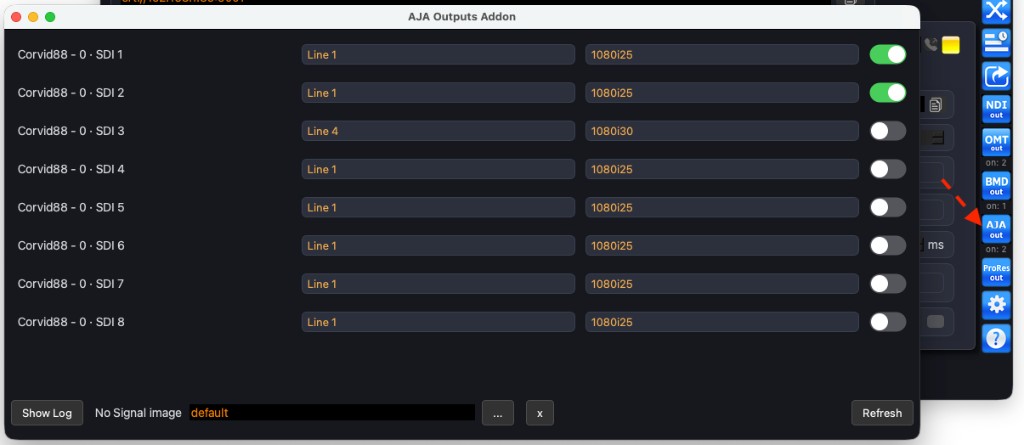
If a channel is missing, press Refresh.
3. Select the line, the format, and turn it on
For the row you want to use:
- choose the line to send (or MultiView)
- choose the video format
- flip the toggle on the right to activate the output
You can change the line or the format while the output is on — that output restarts with the new settings.
Two rows may use the same line. Each active row runs as its own output process.
No Signal image
When there is no live picture on the selected line, AJA Out shows a No Signal image on the card.
To use your own still, press […] and pick a file. Press [x] to return to the built-in default.
Log
Show Log opens the AJA Out log for that addon session — useful if a row fails to start or the card drops.