ProRes Out
Record each line (or MultiView) to Apple ProRes. Pick an output folder, choose the profile, and split files by length — including a rolling max so older segments are removed. Audio is written as stereo-pair tracks.
Encoding uses Apple’s own stack on the Mac — so yes, this is true ProRes.
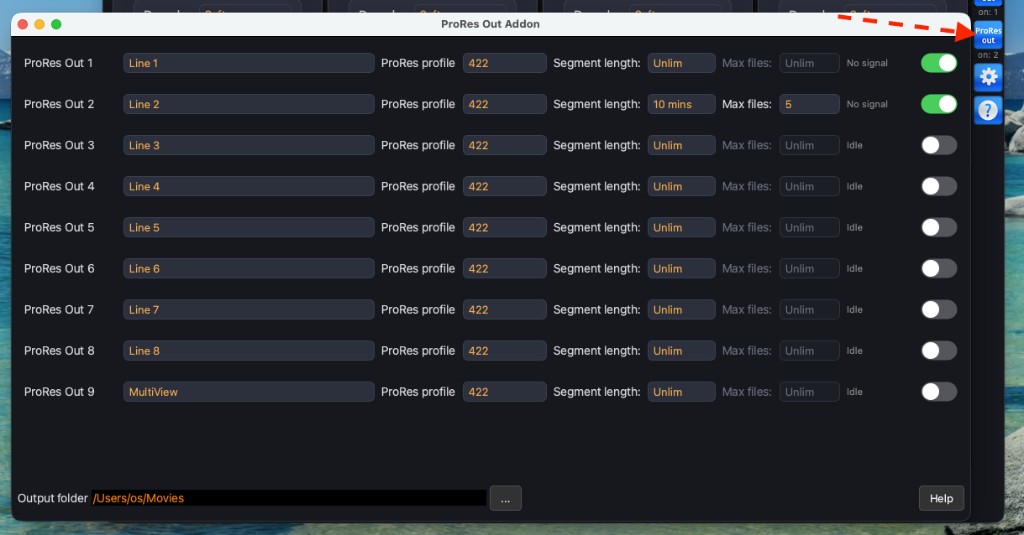
Open it from the ProRes Out button in the right toolbar.
Output folder
One Output folder for all rows. Default is the macOS Movies folder. Press […] to change it. Closed files are valid QuickTime movies; the file currently being written is locked until the segment ends or you stop the row.
Rows
Each row is a recorder. Pick the line (or MultiView), then:
ProRes profile— Proxy / LT / 422 / HQ. Default 422. 4444 is not offered (the internal picture is 4:2:2).Segment length— Unlim, or 5…60 minutes. Unlim = one file until you stop. A timed segment closes the file and opens the next immediately.Max files— rolling limit for that row (Unlim / 5 / 10 / 20 / 30). Active only when Segment is not Unlim. OldestProResOutN_…files in the folder are deleted.- Toggle — start / stop recording. A ProRes badge appears on the line card while recording.
Changing line, profile, Segment, or Max files while the toggle is on restarts that recorder with the new settings.
File names
ProResOut{N}_{source}_{YYYY-MM-DD}_{HH-MM-SS}_{profile}.mov
Example: ProResOut1_Line2_2026-10-06_13-40-00_422.mov
Audio is LPCM. Channels from the line are stored as stereo pairs (an odd leftover channel is Mono).
If the incoming signal drops, the current file is closed so you can take it. When the signal returns, a new file starts.