RTMP Proxy
RTMP Proxy is for encoders that speak RTMP only (for example Teradek) when the receiving Mac has no dedicated IP and you cannot port-forward. The encoder publishes to a proxy; JustMiniServer pulls that session into the built-in RTMP Server.
This is not the SRT Proxy Addon on the INTERNET tab. That path is SRT. RTMP Proxy is a separate dialog.
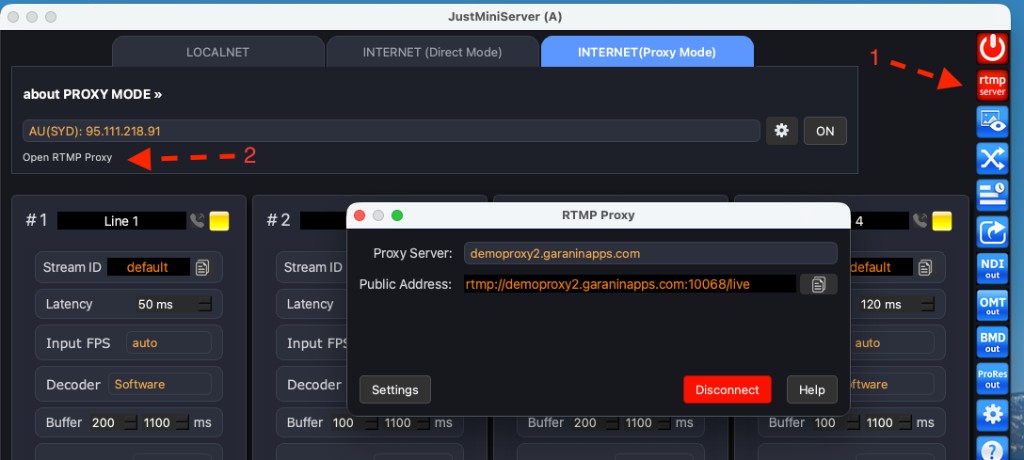
The Open RTMP Proxy control appears once RTMP Server is on.
Before you connect
- Start JustMiniServer (START).
- Turn on RTMP Server in the toolbar (the local RTMP URL must exist).
- Open RTMP Proxy — Open RTMP Proxy on the INTERNET (Proxy Mode) tab, or from the RTMP Server path once the server is running.
Connect
- Choose a Proxy Server in the list (public nodes, plus up to three custom hosts from Settings).
- Press Connect. Public Address becomes an RTMP URL, for example
rtmp://host:port/live. - Copy that URL into the encoder. Publish there, not to the Mac’s local RTMP port.
Closing the dialog does not disconnect. Press Disconnect (the same button, red while connected) to tear the session down.
Custom servers
Settings stores three custom proxy hosts. Use your own node for a long event — public proxies are a shared pool.
Custom RTMP Proxy server
Deploying your own proxy host is the same as for the Custom proxy server (SRT). The only difference is the Docker command.
If you also want to run an RTMP Proxy, use this command:
docker run -p=8080:8080 -p=8082:8082 -p=10000-10100:10000-10100 --env ALLOW_PORT_STICK=ON --restart=always -d garaninapps/rms_proxy
After the container is up, enter the host in Settings (custom proxy hosts) and select it in the RTMP Proxy dialog.